

Features
Responsive Email Layout*
Flex Mail is designed to adapt across supported desktop, tablet and mobile email applications, helping your content remain clear at different screen sizes.
Branded Header
A prominent header displays your logo and can be adjusted to match your colour scheme, helping every email feel consistent with your business.
Two-Column Promotions
A ready-made two-column area allows you to highlight important products, services or website sections using an image, heading and call-to-action.
Header & Footer Navigation
Include useful links in the header and footer to guide recipients towards popular services, support resources and account-related pages.
Social Links
Add links to your active social profiles within the email footer, making it easier for customers to find and follow your business.
Business Address
Display your configured business address within the footer so important sender information is included consistently across your system emails.
Unsubscribe & Preferences Links
The footer includes space for unsubscribe and email preference links, helping recipients manage the communications they receive.
Browser-View Link
A browser-view link can be displayed at the top of the email, giving recipients another way to read the message if their email application has display limitations.
Inbox Preview Text
Add a short preview that supported inboxes can display alongside the subject line before the recipient opens the email.
Customizable Branding
With suitable HTML and CSS experience, you can update colours, logos, links, text and other design details to match your business.
Email-Compatible Code
Flex Mail uses established email-compatible HTML and carefully selected CSS to support popular desktop, mobile and webmail applications.
WHMCS & WISECP Support
Flex Mail supports WHMCS v9 and WISECP v3.0, with compatibility reviewed as new versions are released.
Reviews From Our Clients

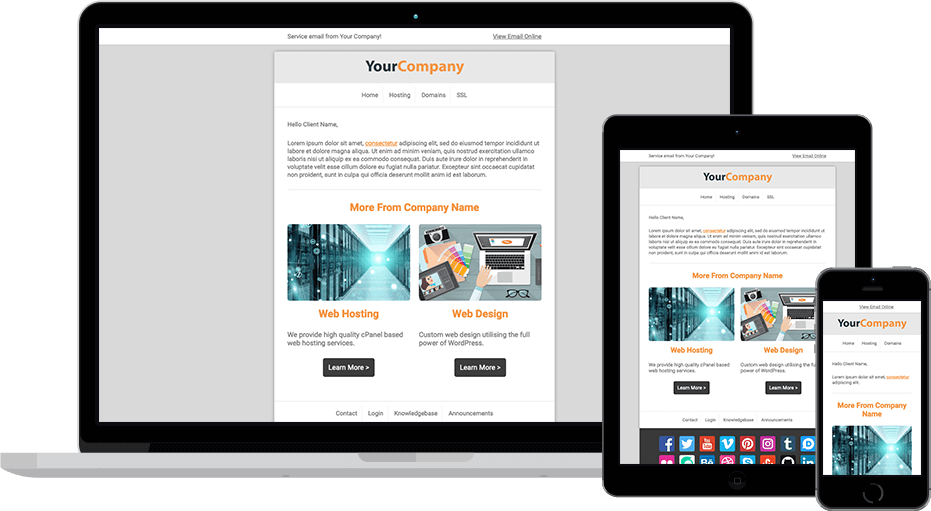
Responsive Email Design*
Clear and accessible across supported devices
Flex Mail is designed to adapt across supported desktop, tablet and mobile email applications. Its flexible layout helps text, images, navigation and calls-to-action remain clear at different screen sizes.
Email applications provide varying levels of support for responsive HTML and CSS, so the exact appearance may differ slightly between platforms. The template uses established email-compatible techniques to provide the most consistent experience possible.

Experienced Product Support
Practical help with installation and compatibility
We released our first Email Template 13 years ago and provide support with the installation, configuration, customization and compatibility of Flex Mail.
Across Zomex, we have answered more than 10,000 support tickets and achieved an overall customer feedback rating of 9.7/10.

WHMCS v9 Support
A consistent design across WHMCS emails
Flex Mail supports WHMCS v9 and applies its branded design across supported system emails generated by WHMCS.
When new WHMCS versions are released, we review the template and provide compatibility updates where required. Existing customers also receive clear documentation to help them safely update their template files.
WISECP v3.0 Support
A consistent design across WISECP emails
Flex Mail supports WISECP v3.0 and applies its branded design across supported system emails generated by WISECP.
When new WISECP versions are released, we review the template and provide compatibility updates where required. Existing customers also receive clear documentation to help them safely update their template files.
Examples


Addons
We offer a selection of optional addons that can be added during checkout. You can also order any addon after your initial purchase from our addons directory.
We will install Flex Mail in WHMCS, integrate your logo and tweak the colors to match your existing website. Sit back and relax while we enhance your WHMCS emails with your branding.
FAQs
Have Another Question?
If you can't find the answer you are looking for, our support is just an email away.
Yes. Flex Mail is built using HTML and CSS, allowing you to update the colours, branding, wording, buttons, content sections and other design details with suitable coding experience.
Flex Mail uses established email-compatible HTML, including table-based layouts and carefully selected inline and embedded CSS.
These techniques help maintain a reliable and consistent appearance across popular desktop, mobile and webmail applications, including older email clients.
Basic HTML and CSS knowledge is recommended when installing or editing Flex Mail. The included documentation explains how to add the design to WHMCS and update the main branding details.
Professional installation and customization services are also available if required.
Yes. The layout is designed to adapt across desktop, tablet and mobile email applications, including responsive columns, buttons, content spacing and images.
Email applications can render HTML differently, but the template uses widely supported techniques to provide the most consistent result possible.
Yes. Flex Mail is designed for the WHMCS email system and supports commonly used WHMCS merge fields for company details, branding, customer information and email content.
The reusable content elements can also be added to individual WHMCS email templates to create notices, buttons, information boxes, invoice summaries, promotions and other formatted content.
Why Zomex?
13 Years Of Email Template Experience
Flex Mail is backed by email template experience dating back to 2013, giving us a detailed understanding of professional email design and customer communication.
Created Specifically For WHMCS
Flex Mail is designed around the emails WHMCS sends every day, including account notifications, invoices, support updates, renewals and service communications.
Built From Real-World Use
Zomex has relied on WHMCS email communication since 2009. That experience has helped shape Flex Mail into a clear, professional and practical email design.
Email-Friendly Development
Flex Mail uses dependable, widely supported email code designed to display consistently across popular email applications, browsers, screen sizes and devices.
Experienced Flex Mail Support
Receive knowledgeable assistance with Flex Mail installation, configuration and customization from a provider that understands both WHMCS and professional email design.
Reliable Support
Over the past 17 years, we have answered more than 10,000 support tickets and achieved a 9.7/10 feedback rating, providing dependable support whenever you need it.