
Use the power of WordPress to build your website and integrate it with Blesta using our ready-made integration template.
Templates
Stellar

Mono
Glaze

Prosper

Features
Wizard Panel Theme Options
Wizard Panel is our exclusive theme options panel found inside WordPress. With Wizard Panel you can edit settings, upload your logo, access shortcodes, manage software integration & more.
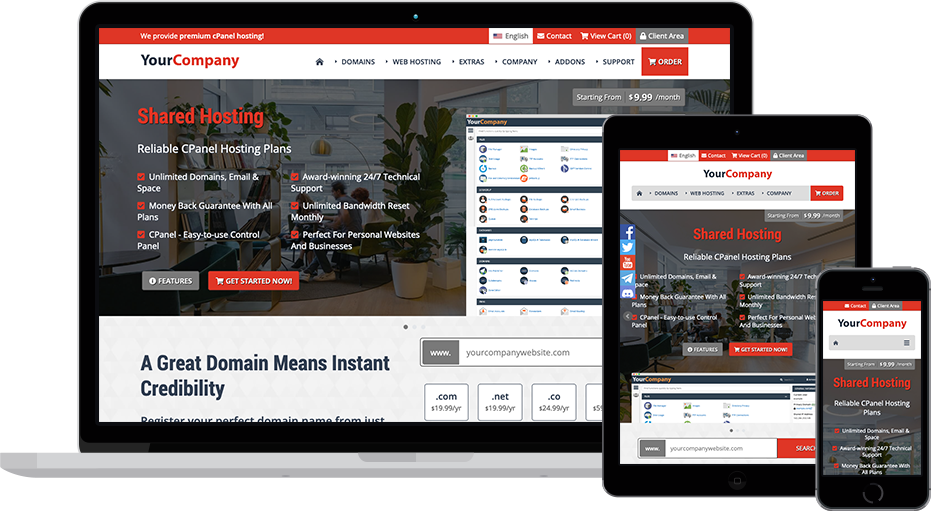
Responsive & Fluid
All of our WordPress Themes are responsive & fluid meaning they will automatically adapt to fit the size of the device (desktop, tablet, mobile etc) your visitor is using.
Blesta Integration ($30)
Our themes come with an optional Blesta template that will match the header/footer of your WordPress Theme for a pixel perfect integration. Easy 5 minutes process following our guide.
Shortcode Generator
Shortcode is similar to HTML but easier to edit. Our themes include exclusive shortcode that generates fully customizable plan display options, banners, content blocks, buttons & more.
6 Plan Displays
Our themes come with 6 product/service display layouts using easy to edit shortcode. Included layouts are pricing tables, data tables, feature boxes & sliders.
3 Menu Designs
All of our themes support 3 menu designs that can be set easily within Wizard Panel. Options include an exclusive mega menu (multi-settings), standard dropdown & a standard menu.
Elementor Support
Our themes support the free page builder plugin, Elementor. Using Elementor you create professional pages/content without any experience using the easy to use drag and drop tools.
2 Header Designs
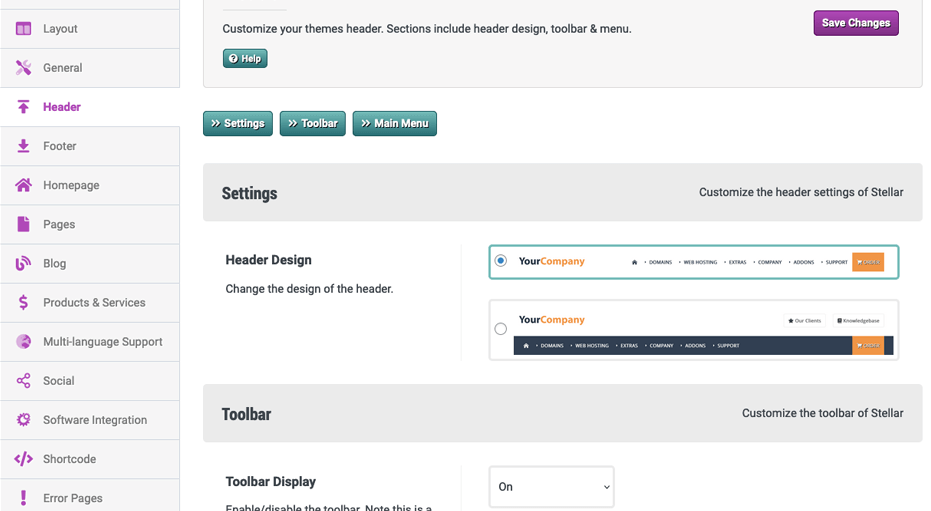
Our WordPress Themes support 2 header design layouts that can be set instantly via Wizard Panel. These options change the positioning of your logo and menu.
Dark & Light Color Schemes
Our WordPress Themes support 2 color schemes with a selection toggle so users can choose their preference. The 2 color schemes are dark and light mode.
No Plugins Required
Our themes include everything you see within the demo without using any plugins. Everything is within the theme itself which is optimum for the speed and security of your website.
Ready Made Pages/Content
Our themes include ready-made pages for the most popular services including Shared Hosting, Game Servers, IPTV & more. These pages also feature exclusive content and are edited using WordPress.
Block Based Content
Our themes utlize the block based content system provided by WordPress. Blocks allow you to easily create and customize rich content using purpose build widgets including shortcode, posts & more.
Widgetized Footer & Sidebar
Use WordPress widgets to customise footer and sidebar areas, giving you flexible content control without editing theme files.
Easy Updates
Our products are built to reduce edited core files, making future updates easier, safer and less time consuming for your website.
Multi-Language Support
Our WordPress Themes have built-in multi-language support thanks to the Google Translate option that can be enabled from within Wizard Panel. They also support RTL alignment.
WordPress v6.7.0 Support
All of our themes support WordPress v6.7.0 out of the box. We ensure that support for new versions is added within 24 hours of WordPress releasing a new version.
Search Engine Optimised
Our themes are very search engine friendly with a focus on content structure, page speed and overall design. You can further enhance SEO using the power of many free WordPress plugins.
Social Integration
We have integrated 25+ social networks throughout our themes with display options in the footer, sidebar & side widget. Manage your profiles and display within Wizard Panel.
Addons Affiliate Integration
We have integrated pages listing our products & services which are hooked up to our affiliate program so you can earn commissions on sales. This is optional and can be removed via WordPress.
Latest Technology
Our WordPress Themes have been built from scratch using the latest technology including PHP8, HTML5, CSS3 & jQuery. We also keep our themes updated with changing technologies.
Industry Leading Support
Over the past 17 years we have answered over 10,000 support tickets and achieved an overall feedback rating of 9.7/10.
Blesta Integration Explained
Our WordPress Themes dynamically generate a copy of your header/footer including all content, customizations and settings. This can then be easily added to your Blesta integration template so both your WordPress website and Blesta match in design. We have created an easy copy/paste process showing you how to apply your websites header/footer to Blesta. Note, the integration is static so it does not update automatically. All of the links between WordPress & Blesta (e.g the Contact, View Cart & Client Area buttons) will work instantly after adding your software URL to Wizard Panel.
Reviews From Our Clients


Wizard Panel
Theme options panel
Wizard Panel is our exclusive theme options panel that can be found inside your WordPress admin area upon installation. Using Wizard Panel you can easily customize various aspects of your theme without HTML experience. Use Wizard Panel to:
- Upload your logo
- Change header design
- Menu settings
- Customize the slider
- Enable/disable settings
- Manage social profiles & display
- Access the theme shortcodes
- Enable/manage software

Responsive & Fluid
Supporting every device
All of our WordPress Themes are responsive meaning they will automatically adjust to fit the size of the device your visitor is using. No matter if someone views your website on a desktop computer or a smart phone your website will scale beautifully to fit. They are also fluid meaning they've been built using percentages rather than fixed pixels so instead of having break-points (e.g iPhone, iPad) they will respond when needed. This creates a very smooth transition and most importantly means your website will support future devices without the need to be updated.

Shortcode Generator
Generate responsive & customizable elements
Shortcode is similar to HTML but easier to edit. Our WordPress Themes come with lots of pre-made shortcode which will automatically generate responsive elements that are fully customizable. Shortcode is as flexible as HTML but much easier to understand and edit. You do not need any coding experience to work with it.
All of the default pages of the theme were created with our exclusive theme shortcode. Shortcode is is also used to display plans within your theme.You will find all of the shortcode in Wizard Panel including:
- Feature Boxes
- Pricing Tables
- Data Tables
- Buttons
- Headings
- Lists
- Feature Grids
- Banners
- & much more

6 Plan Designs
Show off your products/services
Our themes support 6 plan design layouts which can be used on any page and are customizied using shortcode. The 6 plan display layouts are:
- Product Tables 1 - Pricing table design allowing you to easily compare up to 6 diverse products
- Product Tables 2 - Data table design which is perfect for listing products with only a few varying features
- Product Boxes 1 - Popular box design which is bold and easy to display products effectively
- Product Boxes 2 - Boxes design for displaying products/services
- Product Boxes 3 - Boxes design for displaying products/services
- Product Slider - A modern plan display allowing users to slide to compare between plans
Between these 6 layouts you can professionally display your products & services within the theme. From shared web hosting to physical products we have you covered with these fully customizable designs.

3 Menu Designs
Full-featured exclusive mega menu
We have added 3 menu design layouts to our themes which can be set instantly between the menus page of WordPress and the theme options (Wizard Panel). The 3 menu layout options are:
- Mega Menu - a large surface dropdown menu with a description column to the right and menu items to the left. Menu items support icons, descriptions display using 1-6 columns
- Dropdown Menu - a clean and simple 1 column dropdown design
- Basic Menu - bold links with no dropdown
All of our menus are fully responsive using a burger icon design on tablets/mobile. They also support highlighting of active pages and parent categories.

Elementor Support
Create Professional Pages Easily
Elementor is the #1 page builder plugin for WordPress. Using Elementor you can create, customize full pages and blocks of content using their easy to use drag and drop tools.
Our themes come with pre-made Elementor templates which can be imported to replace the default pages with Elementor customizable pages.
2 Header Designs
Instantly change your header design
We've implemented 2 header designs within our themes. The 2 header designs are:
- Header 1 - this header aligns your menu to the right of your logo within the same row for a compact header
- Header 2 - using this layout your logo will be on the top row with an option for call to action buttons on the right. Your menu is displayed on the bottom row creating a bolder header
You can change your header design instantly within the header tab of Wizard Panel.

Dark & Light Color Schemes
Instantly set dark and light color designs
We've implemented 2 color schemes within our themes, dark and light.
Within Wizard Panel you can set the default color scheme and also enable an optional toggle allowing users to change the color scheme.

Block Based Content
Drag & drop content control
WordPress utlizes block based content within the pages, posts and widgets. This separates content into blocks which can be moved to change the order while having a clear visual separation of different elements. Prior to v5 this was only possible by using page builders plugins but due to the popularity and easy of use it is now supported natively by WordPress which is great news for users and developers alike.
WordPress includes many pre-made blocks of content including columns, galleries, images, videos, embeds, posts, social media & more.
All of our WordPress Themes offer full support for block based content out of the box. When importing the demo content during installation the content of each page will be separated as blocks.

Widgetized Footer & Sidebar
Customize your theme easily
Widgets are blocks of content that you can add to supported areas within a theme. Our themes use widgets for the sidebar and footer. Widgets can be customized within your WordPress admin panel without any coding experience. Some of the native WordPress widgets that are available by default are:
- Archives
- Categories
- Calendar
- Navigation Menu
- Links
- Galleries
- Feeds
- Pages
Our themes also come with some exclusive widgets which are customizable via Wizard Panel. These include the social icons you see within the footer and also the company information block.

Easy Updates
Update without loosing any customizations
We have created our themes with easy updates in mind. You can safely update knowing that your content and customizations are safe. All of the content of your WordPress theme is stored within your WordPress database, updates to the theme will replace un-edited files. If you want to customize the CSS you can use our included CSS file which is never replaced during updates.
When using one of our supported software integrations you can update the software with peace of mind as the theme does not make any direct edits to the integration template files. We provide updates to our integration templates within 24 hours of a new version. These updates are provided for free and can be accessed within your Zomex account along with our easy update guide.

Search Engine Optimized
SEO features out of the box
We recommend using an SEO plugin such as Yoost (free) to add the ability to define page titles, meta descriptions and more for every page of the theme.
The code structure of our WordPress Themes has been created with SEO is mind, for example we have used the correct structure for main elements and the proper use of heading tags.
We have also compressed all images and Javascript to ensure your website is lightning fast. Page load times are increasingly a important part of modern SEO.

Industry Leading Support
One ticket at a time
Since launching our first WordPress Theme 16 years ago we have gained a reputation for providing very reliable support. Over this time we have answered over 10,000 support tickets and achieved an astounding feedback rating of 9.7/10.
You will find many of our public reviews on the WHMCS Marketplace & webhostingtalk.com forum.

Blesta Integration ($30)
Combine the power of WordPress + Blesta
Integrate your WordPress Theme with Blesta using our integration template. Easily apply your themes header/footer/images/settings to the Blesta template using our copy/paste process. This creates a pixel perfect integration between your WordPress website and Blesta.
The Blesta Integration Template fully supports Blesta v5.12.
Select the Blesta Integration Template addon during checkout and experience the true power of this combination.
FAQs
Have Another Question?
If you can't find the answer you are looking for, our support is just an email away.
No, our WordPress Themes with Blesta integration do not require any coding experience thanks to our exclusive options panel and the built in WordPress functionality. Our themes use shortcode for the default pages which is a easy to edit code. No experience is necessary and our staff are available to assist if needed. CSS experience is an advantage if you want to change the color scheme but not required as we have a detailed guide on how to do this.
No, while the themes include web hosting related content they are fully customizable and can be used for any type of business or website.
Our WordPress Themes support integration with Blesta. During checkout you can select this integration addon allowing you to utilise Blesta with your theme. Blesta adds a lot of functionality to your website including client accounts, automation, cart, invoices, support tickets & more.
We recommend the following setup:
domain.com - your WordPress Theme
domain.com/clients/ - Blesta using the integration template we provide
We provide an easy to follow integration process which guides you on adding your WordPress Themes header/footer/CSS/images to Blesta creating a pixel perfect integration. With this setup you can use the WordPress Theme to build your website, sales pages, content pages etc. To create a functioning order process all you need to do is add your link to each product setup in the software to the order buttons of the WordPress pages. So your visitor views your WordPress page, clicks on the order button and they are taken to Blesta to purchase.
You will need a domain name and a web hosting account that supports WordPress (most do).
If you are planning to use this theme to provide web hosting/domain services we recommend using one of the software integrations to add the useful functionality such as account provisioning, automation, carts, client areas etc. Each software will require a license apart from FOSSBilling which is free and open source.
In order to provide web hosting services you will need a reseller hosting account, VPS or dedicated server which can be provided as automated services to your clients using either of the software. We recommend reading our detailed guide on how to start a web hosting reseller business.
Why Zomex?
14 Years Experience
We have been providing high quality Blesta Templates since 2012 and have gained a huge reputation for the high quality templates and un-matched reliable support we provide.
Unmatched Passion
We have a deep passion for Blesta, having worked with it since 17. At Zomex we have used this experience to develop what we feel are the best value Blesta Templates.
One-Stop Shop
Zomex is a one-stop shop for your Blesta based business. Not only do we provide Blesta Templates but also all of the services you could need including WHMCS Configuration & Logo Design.
Web Hosting Industry Experience
What sets us apart from the competition is our experience in the web hosting industry. We have used this experience to create templates with the most important features.
Great Value For Money
The themes we provide represent very good value for any new or existing Blesta business. Between the high quality features and experienced support included we have your business covered.
Reliable Support
Over the past 17 years, we have answered more than 10,000 support tickets and achieved a 9.7/10 feedback rating, providing dependable support whenever you need it.
About Our Blesta Templates
Our Blesta Templates are primarily WordPress Themes which can be edited easily without HTML experience. This gives you complete control over editing and extending your website. Select the Blesta Integration Template during checkout to add support. This template can be integrated with your WordPress Theme easily so it matches your websites header/footer/images/CSS.